For the complete documentation index, see llms.txt. Markdown versions of documentation pages are available by appending
.mdto page URLs; this page is available as Markdown.
Client Life Cycle Statuses
This page details the Client Life Cycle Statuses and the transitions between the various statuses.
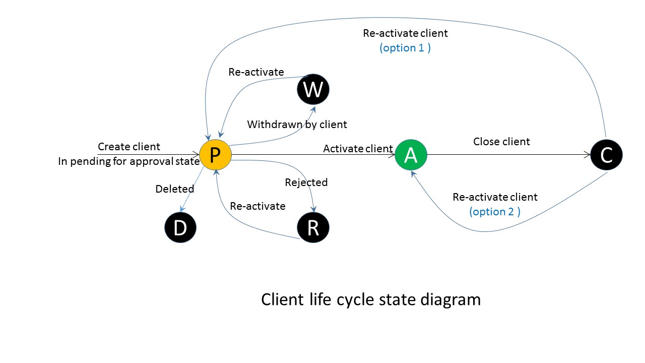
| Action | State |
|---|---|
| Create client | Pending for approval |
| Activate | Active |
| Close | Closed |
| Reject | Rejected |
| Withdrawn by client | Withdrawn |
| Delete | Deleted |
| Reactivate | Active |
On creating a new client, it moves into the "Pending for approval" state. From the approval state, it can undergo the following transitions:
- On clicking on "Activate", the client gets "Active".\ OR
- On clicking on "Close", the client gets "Closed".\ OR
- On clicking on "Reject", the client gets "Rejected".\ OR
- On clicking on "Withdrawn by client", the client gets "Withdrawn".\ OR
- On clicking on "Delete" the client gets "Deleted". Once a client gets deleted, it won't show up anywhere in Spade Core Banking.
- If the client is in the "Closed" state, it can be "Reactivated" to make it "Active".
- If the client is in the following states: Rejected/Withdrawn/Deleted, it cannot be Activated again.
NOTE: For the actions mentioned below, we need to update reasons as mentioned below in the Code Values (for more information, navigate to Admin >> System >> Code) :
| Action | Reason |
|---|---|
| Close | Client closure reason |
| Withdraw | Client withdrawal reason |
| Reject | Client Rejection reason |
{% hint style="info" %} Link for Reference: Manage Clients {% endhint %}
Related articles