For the complete documentation index, see llms.txt. Markdown versions of documentation pages are available by appending
.mdto page URLs; this page is available as Markdown.
Manage Hooks
Hooks are a mechanism to trigger custom code on the occurrence of events. In other words, Hooks are notifications sent to any external application (which can be accessed through a web address) from Spade Core Banking in the format the external application wants. Each template during hook creation represents custom behavior on what actions should be taken on the triggering of a registered event for a hook. The action taken might be firing an HTTP request to another server or executing an internal code.
In order for Spade Core Banking to send webhook payloads, your server needs to be accessible from the Internet. Spade Core Banking will send along a few HTTP headers to differentiate between event types.
X-Spade-Entity - The entity type that was triggered. \ X-Spade-Action - The action triggered on the entity type. \ X-Spade-Platform-TenantId - The tenant which experienced the event.
You can create two types of Hooks using Hook Templates.
- Web
- SMS Bridge
Create a Web Hook
- Go to Admin >> System and click on Manage Hooks.
2. Click on 'Manage Hooks' and then click on '+Create a Hook' to see the following window. (Here, select Hook Template as "Web" from drop-down menu)
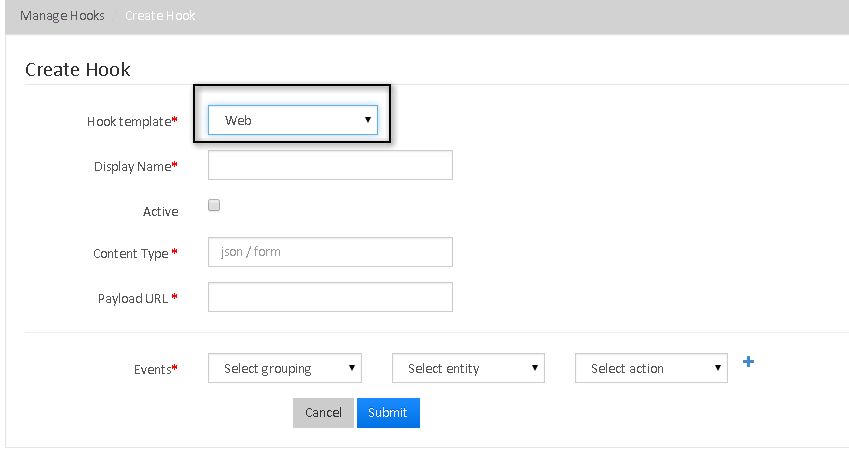
3. "Create a Web Hook" Fields:
| SI.No | Field Name | Drop-Down Parameters | Description |
|---|---|---|---|
| 1 | Hook template |
|
Select the 'Web' hook in this case. |
| 2 | Display Name | None | The name of the template that is being called. |
| 3 | Active | None | Please Check it to trigger the hook. |
| 4 | Content Type | None | The format in which the external application is expecting the notifications to come in. JSON (application/json) or FORM (application/x-www-form-urlencoded). |
| 5 | PayLoad URL | None | The web address at which the external application is expecting notifications to come in from Spade Core Banking. |
| 6 | Events |
|
You can select any one of the event for which the hook is triggered for. |
| 7 | Select Entity | For each selected event (Example: Portfolio), you have to select the entity from drop-down list like, Loan, Center, Client etc (for Portfolio event) | |
| 8 | Select Action | For each selected Event and Entity, you have to select the specific action from the drop-down list. |
4. Click on "Submit" button to create a 'Web' Hook.
Create an SMS Bridge Hook
Note :i) You need to clone https://github.com/mgeiss/mifos-twilio-bridge and do a gradlew bootRun to start the application which will act as a bridge between Spade Core Banking and Twilio.
ii) Your mobile number should be registered to twilio. (See the link for more information: http://www.twilio.com/help/faq/phone-numbers )
- Go to Admin >> System >> Manage Hooks.
- Click on 'Manage Hooks' and then click on '+Create a Hook' to see the following window. (Here, select Hook Template as "SMS Bridge" from drop-down menu).
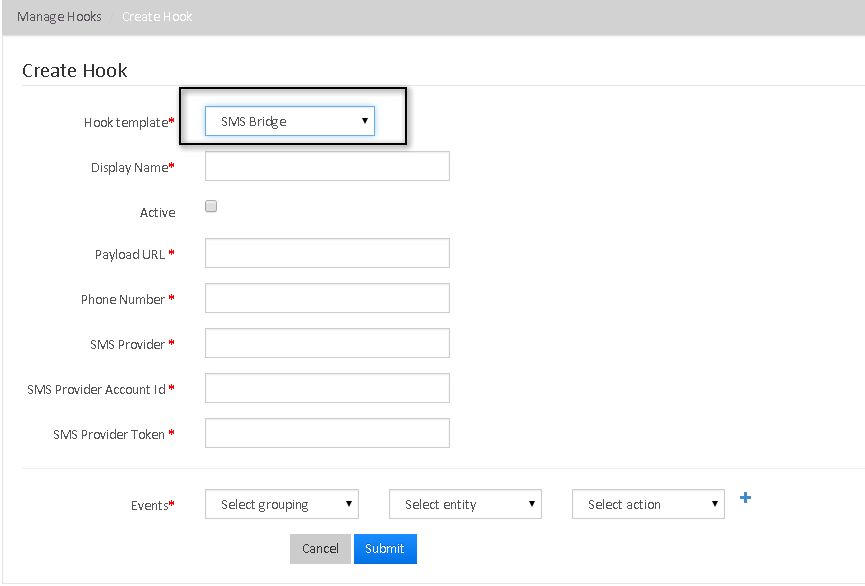
' 3. Create SMS Bridge Hook' Fields:
| SI.No | Field Name | Drop-Down Parameters | Description |
|---|---|---|---|
| 1 | Hook Template |
|
Select the 'SMS Bridge' hook in this case. |
| 2 | Display Name | None | The name of the template that is being called. |
| 3 | Active | None | Please Check it to trigger the hook. |
| 4 | Payload URL | None | http://localhost:9191/modules/sms, Provide this as Payload URL only for "SMS Bridge", not for "Web" hook template. |
| 5 | Phone Number | None | This field has to be the phone number with which the person registered for the SMS service provider (Example: Twilio) and not some random number. |
| 6 | SMS Provider | None | The only value this field supports right now is Twilio. (In the future, it can be other providers as well). |
| 7 | SMS Provider Account Id | None | It is obtained from the SMS Provider website when you register there. Example:- When you pay and register for an account in Twilio. |
| 8 | SMS Provider Token | None | SMS Provider Token is the token generated by the bridge (required to communicate with the SMS provider) on starting the application. |
| 9 | Events |
|
You can select any one of the event for which the hook is triggered for. (Note: The only 2 events in Spade Core Banking currently supported by the bridge application are CREATE CLIENT and REPAYMENT LOAN. The bridge application won't react to other events registered for the SMS Bridge Hook.) |
| 10 | Select Entity | For each selected event, (Example: Portfolio), you have to select the entity from drop-down list like, Loan, Center, Client, etc ( for Portfolio event) | |
| 11 | Select Action | For each selected Event and Entity, you have to select the specific action from the drop-down list. |
4. Click on 'Submit' button to create a "SMS Bridge" hook.
Associate a UGD template with an SMS Bridge Hook: Click Here to watch the tutorial video.
Note: i. Do not create an SMS Bridge hook with your own mobile number if you have not registered for Twilio.
ii. If you create multiple clients in Spade Core Banking with the same mobile number for testing (by deleting the client and creating a new one), that might not be supported by the bridge application because of unique mobile number constraints.
iii. If you somehow lose/clear the database contents for bridge application, it is better to delete the hook in Spade Core Banking and create a new one.